
Welcome, Poster Presenters!
This page is for confirmed speakers participating in a poster at the 2026 ER&L Fest. See below for important information regarding your poster requirements, what to expect during the attended poster session, how to interact with the audience, and more.
Important Dates
- Online Practice Day: Feb 18
- Upload Online Poster PDF: by Mar 1
- Optional: Enable Polls by Mar 1
- Monday Session Set Up: by Mar 2, 2 pm
- Tuesday Session Set Up: by Mar 3, 10 am
- Poster Tear Down: by Mar 4 12:00 pm
- Revisit online platform to answer questions from attendees: Mar 9
‼️ IMPORTANT ‼️
- Posters must be printed and physically brought to Austin.
- The only printing capabilities onsite are in the Business Center on 8.5 x 11″ paper in black and white.
Poster Presenter Checklist
- Register for the conference ASAP.
- Log into the Speaker Portal to update your profile.
- Build your poster and script (a short 3-minute summary of your poster to offer commentary to attendees visiting your poster in the Poster Session).
- Upload a digital version of your poster to the Speaker Portal by Practice Day, Wed, Feb 18 (no later than Sun, Mar 1)
- Optional: Attend Practice Day and run your Practice Day Checklist on Wed, Feb 18, 1:00-3:00 pm Central Time.
- Locate your Poster
- Ensure correct digital materials are uploaded and viewable.
- Create and test your attendee polls.
- Enable all created polls upon completion and no later than Mar 1.
- Print your poster and bring it to Austin.
- Set up your poster by Mon, Mar 2, 2:00 pm / Tue, Mar 3, 10:00 am.
- Attend Poster Session
- Remove your poster by Wed, 12:00 pm
- Visit the Online Conference Platform to resolve all questions left by attendees on your poster by the end of Mon, Mar 9.
What is a Poster Presentation?
Posters are of great value to the community because it offers visual, flexible, and interactive access to your content.
Your poster may receive visitors when the Exhibt Hall is open on the day of your Poster Session. While the onsite attendee interaction components of your poster end at ER&L, poster presenters may add all visual components of their poster and short video summary onto the Online Conference Platform for online attendees to view for a year after the conference.
REQUIRED
- A complete Printed Poster
- Poster Session Attendance in Austin
- Attendee-facing Digital Format Poster
OPTIONAL
- One or more Attendee Polls to engage attendees with topics presented in your talk.
- Plan a Community Connection.
Printed Poster Guidelines
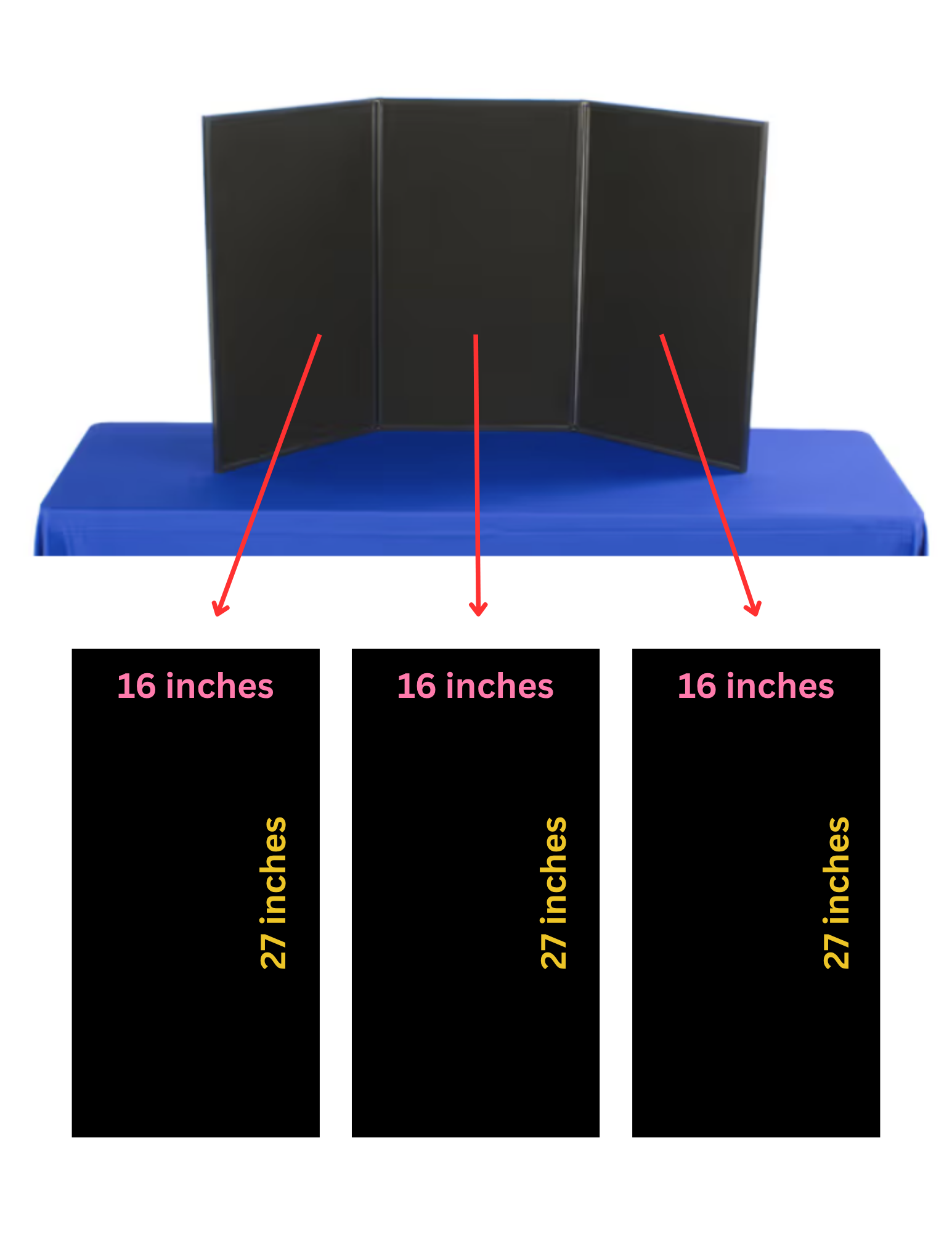
New for 2026: All posters will be mounted to a 3-panel hinged board.
- Each board has 3 panels, with usable space measuring 16 inches wide by 27 inches tall on each panel. Your poster pieces must fit into those dimensions. Materials that extend past the edge of the board will not be allowed.
- Canva users: use this template to create your poster panels.
- Velcro tabs will be provided for mounting your poster panels.
- The poster must include the title, the presenter’s name, and their affiliation.
To ensure all attendees can view your poster:
- Your poster should be legible from a distance of at least 6 feet.
- The font size should be at least 20 points. We recommend using sans-serif fonts. Some recommended accessible fonts are Arial, Calibri, Century Gothic, Helvetica, Tahoma, and Verdana.
- Choose a color scheme that provides sufficient contrast between the text and the background. This will make it easier to read.
- Images should be at least 5 inches in size, and graphs and data sets must be large enough to remain readable from 6 feet away.
- Proper attribution is essential. At ER&L, all presenters are required to include appropriate citations and attributions for all images, graphics, and research outputs that are not original.
- Commercial activities or advertising are strictly prohibited in your poster. Non-compliance with this guideline may affect your future eligibility to present at ER&L.
- Review our Presentation Tips and Accessibility Guidelines.
What to Expect in Austin
One poster presenter from each accepted poster is required to be in Austin during their designated Poster Session. During these 50 minutes, attendees will view your poster and possibly ask questions.
POSTER SET UP
- All poster materials should be prepared and printed prior to the conference. The only printing capabilities onsite at the conference are in the Business Center (M2) with standard black & white ink on 8.5 X 11 paper.
- Presenters are responsible for mounting their own posters.
- Monday Poster Session – Posters must be set up by Mon, Mar 2 at 2:00 pm.
- Tuesday Poster Session – Posters must be set up by Tue, Mar 3 at 10:00 am.
- Poster tubes may be stored in the Speaker Ready Room during the conference dates.
DURING YOUR POSTER SESSION
Poster Presenters are expected to be at their posters during their designated Poster Session. The Posters Session space will include:
- 6-foot tables with one 3-panel poster mounting board on each table.
- Extra Velcro tabs to mount your poster on the panels.
- Space on each table to place handouts or other supplementary materials.
- Seating for poster presenters, as needed.
POSTER TEAR DOWN
- Presenters are responsible for removing their own posters and supplementary materials by Wed, Mar 4 at 12:00 pm.
- Posters and supplementary materials left behind after the teardown will be recycled or otherwise discarded.
Speaker Portal
Log into the Speaker Portal to update your speaker profile. Here are some suggestions for building your profile:
- Please upload a recent photo or headshot. If you prefer not to upload a photo, your initials or the conference logo will be in place of a photo.
- Add a biography to let your audience get to know you!
- Add additional links to LinkedIn, Google Scholar, personal websites, etc.
Please remember that your profile is public and not limited to attendees.
Practice Day (Wed, Feb 18)
ER&L provides presenters an opportunity to go through the ER&L platform prior to the start of the conference. This designated time is meant for you to review your poster listing on the Event App and ensure that all of the information is correct prior to the start of the conference.
On practice day, live presenters should complete the short practice day checklist to familiarize themselves with the app and attendee interaction features.
This day is for testing. ER&L will remove all of the comments made on Practice Day and start with a clean slate for ER&L.
PRACTICE DAY CHECKLIST
- Log into the Event App.
- Update your profile.
- Type a comment into the Lobby chat.
- Locate your session on the Schedule tab.
- Enter a text comment into your Session chat.
- Review the session description and attached digital materials.
- Create a poll for your session via the ‘Backstage’ tab. Enable all polls upon completion or no later than Mar 1.
Practice in Austin (Speaker Ready Room)
Presenters of all session types are welcome to meet and practice in the Speaker Ready Room (Room 105, M1). Work out your nerves or just work in a private room with access to power, dry-erase boards, and a lectern to practice your presentation.
Digital Poster for Online Attendees
- Presenters should upload a digital version of their poster for online attendees to view.
- Other digital materials such as templates, documentation, and samples to augment their presentation may also be uploaded.
- These files are uploaded via your Speaker Portal.
- Presentation files will be available to all attendees on the Online Conference Platform and Event App page associated with your session.
- One presenter should supply the file(s).
- Presenters may choose not to share files, however, we strongly encourage sharing the presented information since that is the core of what we’re facilitating at the conference.
HOW TO UPLOAD YOUR DIGITAL POSTER
Log into the Speaker Portal:
- Click the Sessions tab.
- Locate the session (if you are presenting multiple, you will have multiple listed.)
- Click ‘Session Files’.
- Click ‘Add New File’.
- Browse for the file.
- Give the file a description/ title that will appear for attendees.
- Make sure ‘Is Private’ is UNchecked.
- Click ‘Add File’.
Using Polls for Audience Interaction
- Polls are a great way to connect with attendees.
- We recommend 2-3 polls per session.
- Presenters will be able to configure polls in the ‘Backstage’ tab in the Online Conference platform.
- Answers from the online attendees are calculated and displayed in real-time.
- We recommend having polls created and enabled when the conference starts so online attendees can answer the polls as soon as your session starts.
HOW TO MANAGE POLLS
Log into the Online Conference Portal:
- Click the ‘Backstage’ tab in the left menu; there, you will see the session(s) in which you are speaking.
- Select your session and click on the ‘Polls and Q&A’ tab.
- Click on ‘Add New Poll’ to add a new poll and to modify existing polls.
- To enable the poll, check ‘Enable’; a red dot will appear at the top of the Poll tab.
- To disable a poll, check ‘Disable’
Online Attendee Interaction
The platform provides three adjacent spaces for online audience interaction:
- Chat: Attendees can comment and upvote.
- Q&A: attendees can ask questions or upvote questions already asked.
- Polls: you will optionally set up for your audience.
Online audience interaction will be available until March 31. Presenters have no obligation to respond unless they wish to do so. If you prefer comments and questions to be sent to you directly after the conference, post your email address in the Comments/ Chat tab, indicating your willingness to accept additional questions directly.
Registration
The discounted speaker registration rate is $595 for the in-person conference. All accepted presenters are expected to register prior to the conference.
- Attend In-Person: Register Here
ER&L will work with any accepted presenter to ensure attendance. If you require discounted or waived registration due to hardship or lack of employer funds to enable your participation, please contact the ER&L Team at hello@electroniclibrarian.org.
Code of Conduct
ER&L’s Code of Conduct and Commitment to Accessibility and Inclusivity apply to presenters and attendees.